Kitchen Mode
Cook. Talk.
Done.
Kitchen Mode turns your kitchen into a smart logging studio. Powered by Gemini AI with bidirectional audio streaming, it listens to you cook and logs everything in real time — completely hands free.
Real-time voice parsing
Speak naturally. Watch your entries appear live.
How It Works
Four steps.
That's it.
Open Kitchen Mode
Tap the microphone icon from anywhere in the app. Dialed activates real-time voice recognition and begins listening.
Speak naturally
"I had two eggs, some toast with peanut butter, and a glass of milk." Talk like you normally would. Dialed understands context, quantity, and food names.
Review draft cards
As you speak, live draft cards appear with identified foods and nutrition data. Edit quantities, remove items, or add corrections — everything updates in real time.
Save and done
Hit save and your entire meal is logged with accurate macros. All entries are auto-categorized by meal type based on time of day. Cancel discards everything cleanly.
Capabilities
More than a microphone
Kitchen Mode is a full voice-driven food logging system with intent parsing, corrections, and custom food creation built in.
Natural language understanding
Say "two eggs and some toast" or "about 200 grams of chicken breast" — Dialed parses quantities, food names, and preparation methods from natural speech.
Multi-item logging
Log your entire meal in one sentence. "Scrambled eggs, two slices of bacon, toast with butter, and a coffee with cream" becomes four entries instantly.
Voice corrections
Made a mistake? Just say "actually that was rice, not quinoa" or "remove the banana." Dialed edits your draft cards in real time without restarting.
Custom food creation
If Dialed can't find a food, it guides you through creating one by voice. "What's the protein per serving?" — speak the values and a new custom food is saved.
Smart meal categorization
Entries are auto-labeled as breakfast, lunch, dinner, or snack based on time of day and calorie density. All items from one Kitchen Mode session are grouped together.
Session state machine
Kitchen Mode tracks session state — normal logging vs. mid-custom-food-creation — so it always knows context. Your session is never confused about what you're doing.
Scale Integration
Voice + scale = perfect data.
Kitchen Mode knows whatyou're eating. A connected Bluetooth scale knows how much. Together, they eliminate guesswork entirely.
Place food on scale
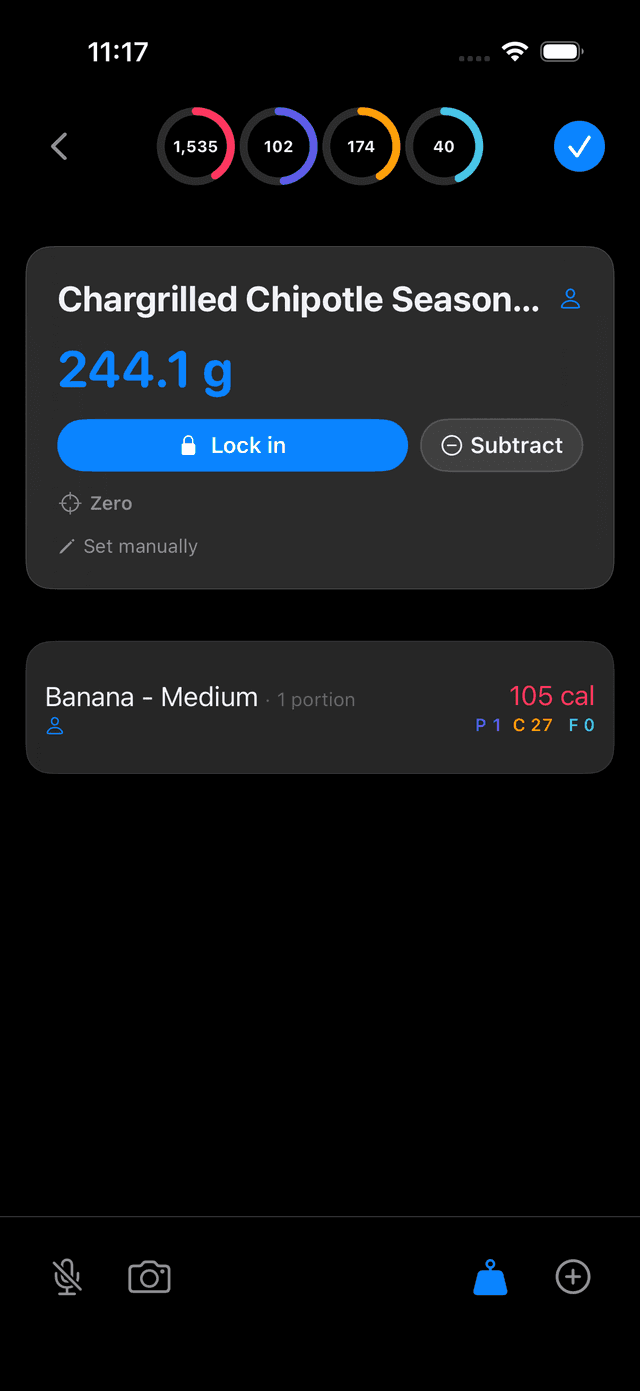
Set your ingredient on the connected Bluetooth scale. Weight streams live to Dialed — grams update on your phone in real time.
Tell Dialed what it is
Say "that's chicken breast" or select the food manually. Kitchen Mode pairs the food with the scale's exact weight automatically.
Tare, add, repeat
Zero the scale, add your next ingredient, log it. Build an entire bowl or plate one ingredient at a time — every addition weighed perfectly.
Gram-perfect macros
No more "about one cup." The scale's weight feeds directly into the nutrition calculation — every macro is exact.
How scale integration works in Kitchen Mode
Auto-connect
Pair once and your scale reconnects automatically every time you open Kitchen Mode. No re-pairing, no setup.
Live weight streaming
Weight data streams continuously over BLE. You see the number update in real time as you add or remove food from the scale — no delay, no polling.
Stability detection
Dialed knows when the scale reading has stabilized vs. when you're still adding food. It waits for a stable reading before locking in the weight.
Multi-unit support
Grams, ounces, pounds & ounces, or milliliters — Dialed reads whatever unit your scale is set to and converts automatically.
Tare & stack ingredients
Zero the scale between ingredients and keep building your bowl. Add rice, tare, add chicken, tare, add sauce — each ingredient logged individually with its exact weight. Perfect for meal prep and composed dishes.
Currently supports Etekcity ESN00
Why this matters
Studies show people underestimate portions by 30-50%. A "tablespoon" of peanut butter can be off by 100+ calories. Kitchen Mode with a scale gives you the most accurate macro tracking possible— and it's actually faster than eyeballing and typing a guess.
Smart Auto-Progression
Prep five ingredients. Place each on the scale, scan the barcode, move on. Each new scan confirms the last item and resets the scale — log a whole meal without touching your phone.
Draft Cards
Three states. Always clear.
Every draft card in Kitchen Mode has a distinct visual state so you always know what's happening.
Food identified, nutrition loaded. Ready to save. You can tap to edit the quantity or swap the food match.
Dialed needs more info. The card pulses with a highlighted question — "Did you mean brown rice or white rice?" Respond by voice.
Food not found — Dialed is guiding you through creating a custom food. Fields fill progressively as you speak each nutrition value.
AI that parses, never fabricates
Gemini AI understands what you said and identifies the foods you mentioned. It never generates, estimates, or approximates nutritional data. Every calorie and gram comes from USDA FoodData Central or your own verified custom foods.
This is a deliberate design choice. If Dialed can't find a food with verified data, it asks you to clarify or guides you through creating it — it never guesses. The food lookup chain is: your custom foods → community foods → USDA database → voice-guided creation.
Session outcomes
Kitchen Mode sessions are designed to be safe and predictable.
Save or navigate away
All draft entries are persisted to your food log. Any custom foods you created during the session are saved permanently for future use.
Cancel
Everything is discarded cleanly — all draft entries and any custom foods created during the session are deleted. Nothing persists.
Try Kitchen Mode
Join the beta and experience hands-free macro tracking. Your kitchen is about to get a lot smarter.
Get Early Access